Accessing JSTOR Text Analysis Support
This tutorial shows how to register for a JSTOR account and use the JSTOR Text Analysis tools, which replace the now-ended Constellate platform.
Users must use Python to analyze JSTOR text data. See below for JSTOR’s introductory and intermediate guides to Python.
Register for a JSTOR account
If you are off-campus, connect via VPN so that Constellate recognizes that you are associated with the University of Toronto. For more info on connecting via VPN, please see the following: UTORvpn.
Go to the JSTOR homepage.
Click on “Log in” at the top right.

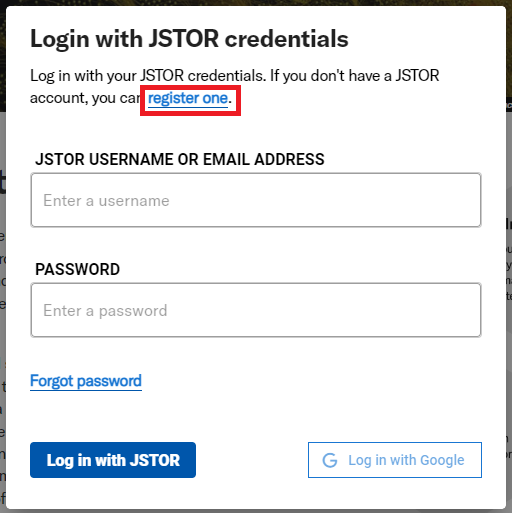
If you already have a JSTOR account associated with UofT, use that to log in, otherwise click on Register (just below “Log in to JSTOR”)
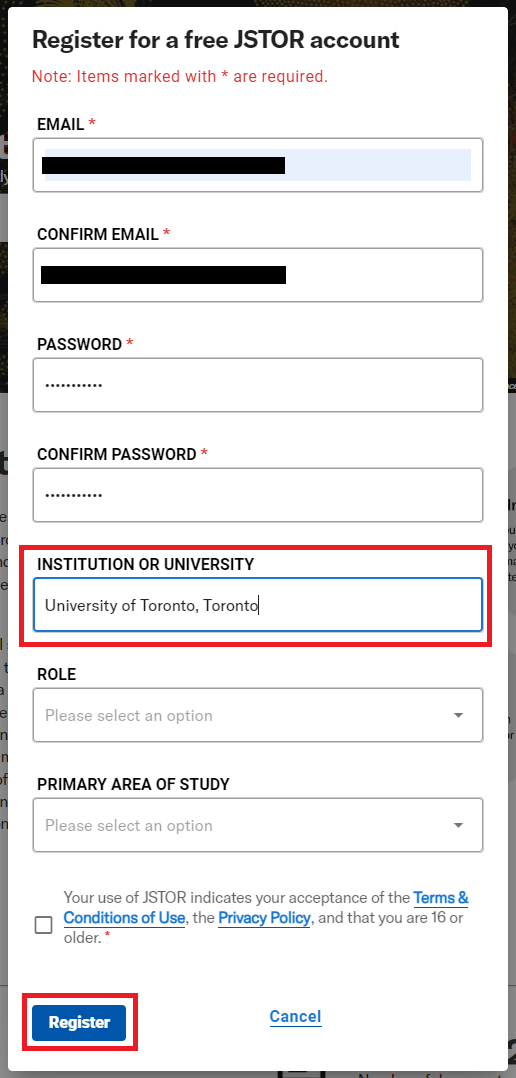
When registering, fill in the form with your utoronto email address, and make sure that the Institution or University box says “University of Toronto, Toronto.” This is going to pair your account with UofT for the trial access, along with being on a UofT network either on campus or via VPN for off campus. Click on register when you are done.
After registering or logging in, you should be taken back to the JSTOR homepage, with a banner at the top saying “Access provided by the University of Toronto, Toronto” and your username at the top right. Now you’re logged in.

This process of pairing UofT with your JSTOR account should only need to happen once.
Finally, go to JSTOR’s Text Analysis Support landing page and get started.
Resources for using JSTOR Text Analysis
- Three Quickstart Guides
- Older Constellate Jupyter notebooks
- Additional Jupyter notebooks from the Text Analysis Pedagogy Institute (TAPI)
- Access training videos