Getting Started with R code
The basic format for commands is the combination of functions and argument values. A function is a word or an abbreviation of words, followed by brackets. For example: read.table(), xrange(), or plot(). The words give you a sense of what the function is supposed to do. You enter the necessary information or argument values inside the brackets. For example, inside the parenthesis of the read.table() function, you enter the data table you want to read. Finally, you can use functions on other functions. Here are some examples below.
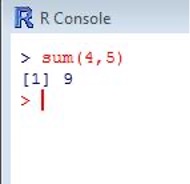
This gives you the sum of 4 and 5. 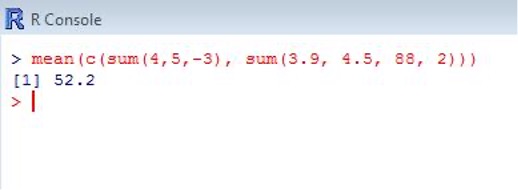
This gives you the mean of the sums of the two different sets of numbers, thus combining the sum function and the mean function. Once you know more about R, you can even write your own functions. More on scripting will come later.
Troubleshooting tips:
- Commands are case-sensitive, i.e., load() will run and Load() will not
- Always check spelling – some commands are pluralized and some are not, i.e., names() will run and name() will not
- Check for spaces and misplaced symbols
- Check the help file for the function you are using
Useful hotkeys:
- Save: ‘Ctrl + S’
- New Script: ‘Ctrl + N’
- Run line or selection: ‘Ctrl + R’
- Undo: ‘Ctrl + Z’
- Clear window: ‘Ctrl + L’
PACKAGES
R packages consist of new functions and datasets contributed by the R-users community. The CRAN package repository has more than 18,000 packages. You can search for packages here. There is a large variety of R packages that exist. Some are good for creating graphics; some are good for statistical analysis. Not to worry, you won’t need to download all of them.
Using packages is a two-step process. First you must install the package you want, and then you must load it into R.
- Using the menu:
- Packages -> Install Packages -> Select [package]
- Packages -> Load package -> Select [package]
- Using R code:
- install.packages(“package”)
- library(package)
Troubleshooting tips:
- Check that your desired package is loaded into R from the Packages window
- Packages are built on each other. When installing a new package, it should install the ones it depends on too. If a package is not working, double-check that its dependent packages are also installed.
- Because packages are open source, be sure you check for updates frequently; this does not occur automatically
- When all else fails, there are, usually, comprehensive entries on the CRAN website on each package.
INTRODUCTORY CODE
The R environment can be used to make calculations and create variables. As a new R-user, you might want to practice these simple exercises by typing them into the console window.
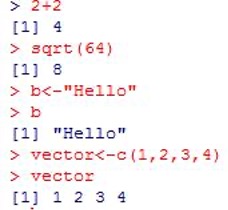
There are different data types in R. These data types can be numeric, integer, logical/boolean, character/string, vector, matrix, array, list, data-frame etc. It is useful to know the data type in order to know what functions can be performed on the data object. To determine the data type, you can use the class() or mode() function. The following commands create different variables and check their type using the class() function. It is also possible to convert from one data type to another by using functions such as as.integer(), as.vector(), as.matrix() etc.
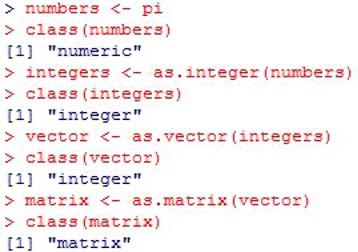
As you can see, pi has been converted from a number to an integer to a vector to a matrix using various R functions.
Before you take a deep dive into learning R, here are some other basic tips, including some initial steps to take in case you encounter an error.
- Environment: The R environment is current workspace. You can view all of the data objects imported or created in the environment using the ls() function.
- Functions: As previously described, functions perform various tasks in R. Each function has a specific number and type of arguments. You can find more information on these arguments in the help file of that function.
- Every time a command is ran there is no way of undoing it. For this reason, you may choose to write your code in the R script window before running it.
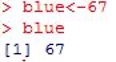
- Printing: Print is R jargon for viewing a data object; it gets ‘printed’ in the console window. To print a data object, simply type and run its name. For example if 67 is assigned to blue (“blue<-67”), then blue must be printed to see its assigned value.
Here are some operators you may encounter:
| ?? | You can use two questions marks to search for functions associated with a specific topic (eg. ??csv). |
| ? | You can use one question mark to open the help file for a specific function (eg. ?read.csv). |
| # | The number sign is used to enter a comment to describe the following commands. See the example below: |
| $ | The $ sign is used to access one variable or column in a dataset. (eg. dataname$age). |
Tool: R